


Craving America’s Favorite Burger? Take a few minutes to complete the Burger King Survey at www.mybkexperience.com and you could earn a free whopper.
I’ll be honest with you all: I do the BK drive-through more than I probably should. The good news is that the BK Survey has become part of my routine. Order, eat, take the survey, get free Whopper code for next time. Easy, isn’t it? The key thing I always tell people is to check the receipt before you leave the drive-through lane, because the survey offer is right at the bottom and it’s easy to miss.
BK Survey Details
- Survey URL: mybkexperience.com (Canada)
- Estimated Completion Time: 4-5 minutes
- Difficulty: Easy
- Requirements: A receipt with a survey code
- Reward: A free whopper
How To Complete The Survey At MyBKExperience.com
The MyBKExperience Canada Survey will take just a few minutes to complete. If you are new at this, make sure to read our survey guide first. If you are ready then, here are the steps to get started.
- BK Receipt
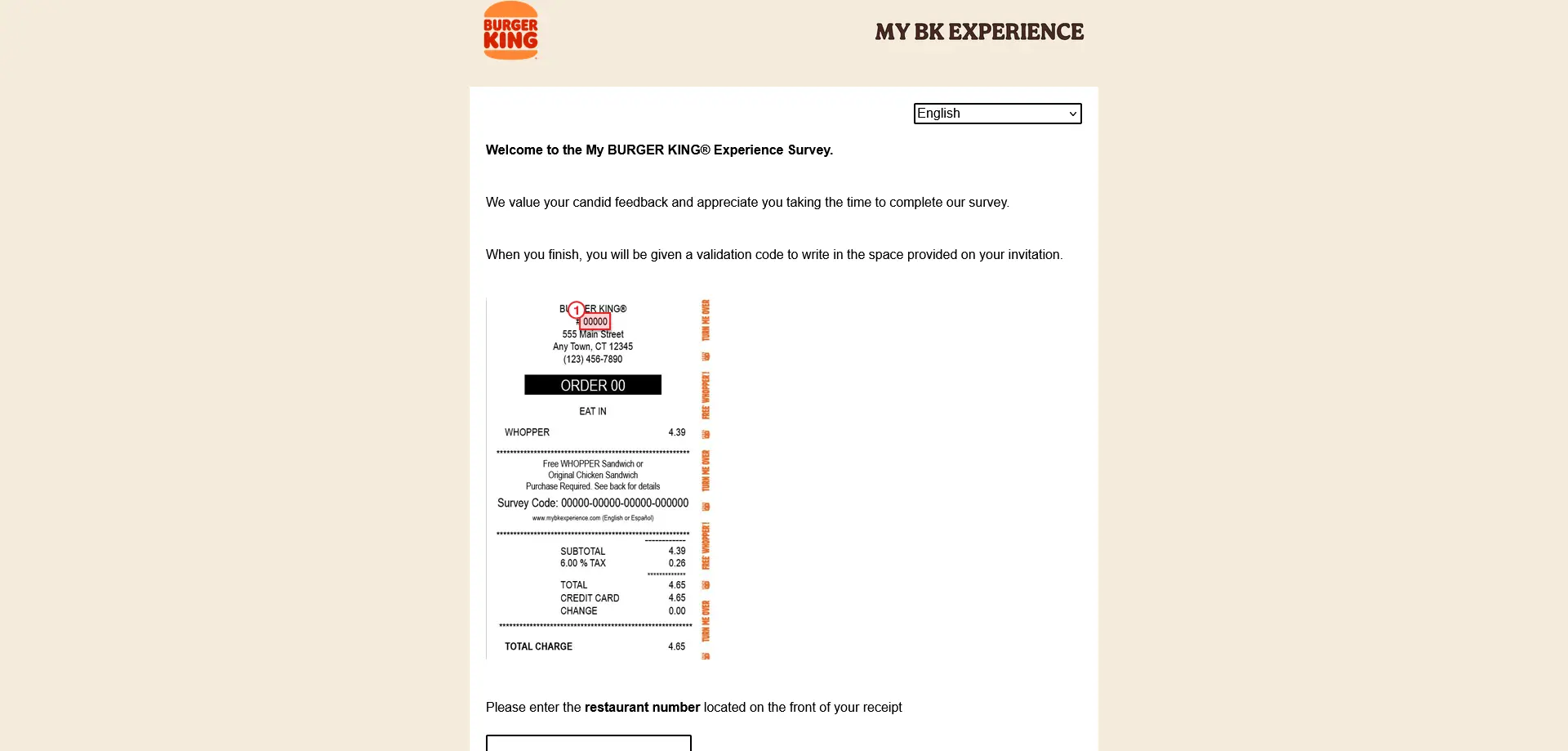
Make a purchase at Burger King and hold onto your BK receipt. Your receipt contains the restaurant number, date and time of visit, and order number needed to start the survey.
- Visit www.mybkexperience.com (Canada)
To get started with the mybkexperience survey, go online to https://mybkexperience.com/ on your phone or computer. Note that this website serves both Canada and the US (Canadian receipts are fully supported).

- Enter your receipt details
Follow the instructions to provide all required information from your receipt, including restaurant number, date, time, and order number. Enter these exactly as they appear on your receipt.
- Complete the survey
Take the survey as directed. Answer all questions honestly. The survey takes about 3 minutes and covers your overall Burger King experience.
- Take note of your validation code
At the end of the survey, you will be given a validation code to write in the space provided on your receipt. Write it down or screenshot it right away. It’s shown only once and you will need it to claim your reward.
What Questions Will The Survey Ask?
The MyBKExperience survey typically covers:
- Your overall satisfaction with your visit
- The quality and taste of your food
- The accuracy of your order
- Speed of service at the counter or drive-through
- Cleanliness of the restaurant
- Friendliness of the staff
- Whether you’d return or recommend Burger King
Tips & Tricks
Check the offer on your receipt first. The specific free item you’ll earn is usually printed on the receipt along with the survey invitation. Know what you’re getting before you start.
Don’t close your browser before copying your code! The validation code appears only at the end of the survey and is shown once.
Act within the expiry window. BK survey codes typically expire within 30 days, which is more generous than most. But don’t forget about it! Either complete the survey right away or set a reminder.
The free item must be redeemed in-store. The validation code is not valid for online or app orders in most cases. Confirm at your local BK.
Frequently Asked Questions
Yes. mybkexperience.com is the official customer satisfaction survey portal for Burger King, used across North America including all Canadian locations.
The free item offer is tied to the specific promotion printed on your receipt. A free Whopper is a common reward, but the exact item may vary by location and promotion period.
In most cases, the validation code must be redeemed in-store. Check the terms on your specific survey confirmation for redemption details.
Burger King survey validation codes are typically valid for 30 days from the date of the survey. Check your confirmation screen for the exact expiry.
About Burger King Canada
Burger King has been serving Canadians flame-grilled burgers since the 1960s, with hundreds of locations from coast to coast. Known for the iconic Whopper and its “have it your way” philosophy, Burger King Canada uses the MyBKExperience survey to gather real customer feedback and reward loyal guests for their time.
Useful Links
Disclaimer: Survey information and rewards are provided as a convenience. We are not responsible for changes or inaccuracies. Participation is at your own risk. Please refer to the company’s official website for the most current details.

5 Comments
Good morning,
I’ve been a long time customer and used the customer survey many times over the years.
Today I tried to complete the survey and after entering the store number (28512) it wanted the survey code number – I’ve copied the request below.
“Please enter the survey code located on the bottom of your receipt (numbers only, no hyphens or spaces):”
This is new and there is no survey code identified on the receipt.
There is however a “transaction ID” – 21 digits long – but it doesn’t work.
Please advise on the how I should proceed with my survey.
Also I have a receipt for store # 302011 but it is invalid – too many digits – the last number (1) seems to be repeating after every piece of information (including their phone # 905 836-82101 ) in the vendor identification at the top of the receipt.
Steven Sydij – email address – steven.sydij@sympatico.ca
Thanks and have a great day
Good morning,
Today I tried to complete the survey and after entering the store number (3950) it wanted the survey code number – I’ve copied the request below.
“Please enter the survey code located on the bottom of your receipt (numbers only, no hyphens or spaces):”
and the survey code identified on the receipt.is a mix of numbers and letters.
There is however a “transaction ID” – 21 digits long – but it doesn’t work.
Please advise on the how I should proceed with my survey.
#5292 71 vermillion rd winnipeg mb take out order placed in restaurant asked for no pickles as im alergic to cuccumber. i didnt quality check the reciept, i got my to go order left got on hwy took a bite found a pickle. turnsout order taker put no onions. i thought she understood my english but guess no. so you burger went out the window for scavangers. i keep trying bk everyone in a while but yall making it hard to return. last good whopper i had was at ft mac airport 3yrs ago, the lettuce was leaf not stem, tomato was ripe not the ends, onion was crisp not the tough outer skin, the bun was fresh not old an white mold. yall need to reeducate your staff as to the way the whopper was made that made it delicious an what use to be my favorite, not so anymore same for others too.
survey does not accept store # is this a fraud
I did the survey, but it did not give me a number to write on the back of the receipt. It assumes I have a smart phone, which I DO NOT HAVE!!!!!! Please advise how I can claim my free whopper.